Professional Broadcast Playout Software Features
Everything you need to schedule, automate, brand, stream, and operate professional television channels. Insta Playout combines playout software, broadcast automation, graphics, NDI workflows, SRT streaming, and multi-channel broadcasting in one platform.
Trusted by Broadcasters in 70+ Countries
70+
Countries
24/7
Broadcast Automation
SD/HD/2K/4K
Format Support
RTMP · SRT · UDP · NDI · SDI
Outputs
Everything You Need to Run a TV Channel
Insta Playout combines professional Playout Software, Broadcast Automation Software, TV Channel Software, IPTV Channel Software, NDI Playout Software, and SRT Streaming Software into a single desktop platform.
Whether you operate a television station, church channel, IPTV network, cable TV system, community broadcaster, or online streaming channel, Insta Playout provides the 24/7 channel automation tools required to distribute content around the clock.
See Every Feature in Action
Real screenshots from the software — every broadcast playout software feature shown exactly as it appears.
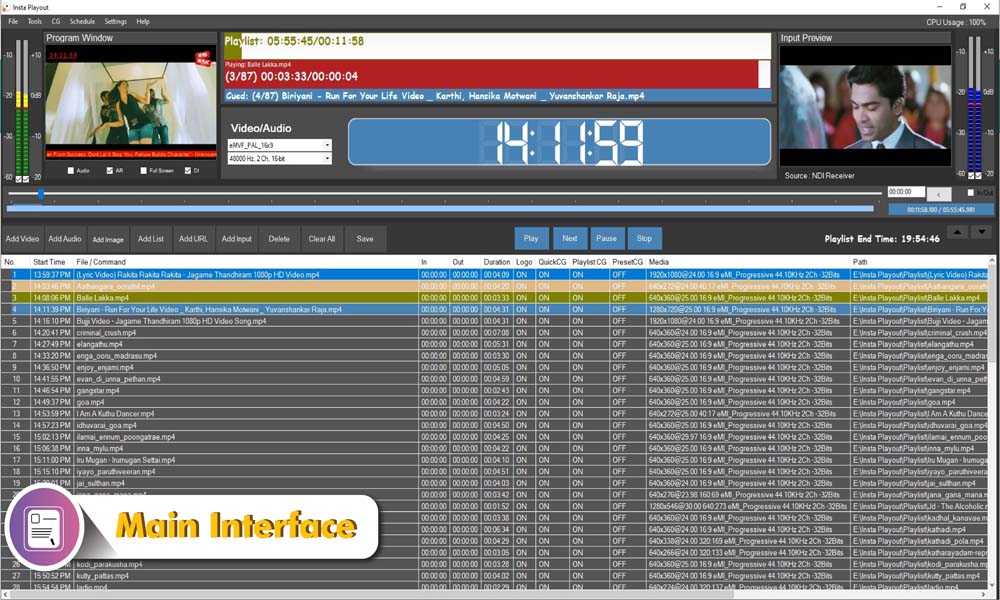
Main Interface
A powerful yet intuitive broadcast control center. Manage your entire playout operation from a single unified interface — program window, playlist, timers, and preview all in one place.
- Real-time program & cue display with countdown timers
- Full playlist management with drag-and-drop ordering
- Live clock and broadcast status at a glance
- Audio level meters and video preview panels
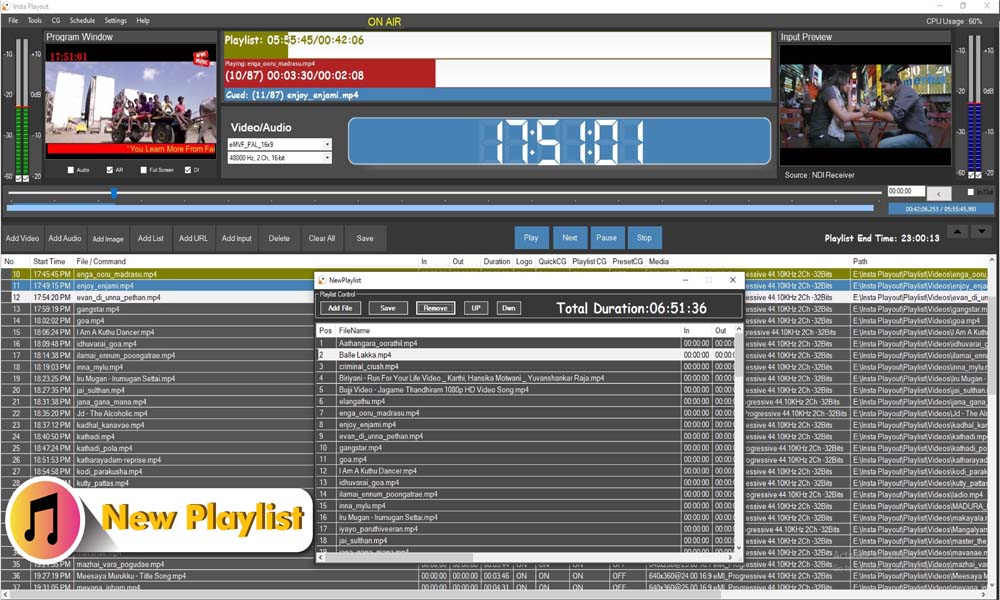
New Playlist
Create and manage playlists with ease. Build your broadcast lineup in minutes — add videos, reorder them, set in/out points, and see the total duration instantly.
- Add multiple video files at once
- Drag to reorder with UP/Down controls
- Displays total playlist duration
- Save and reload playlists anytime
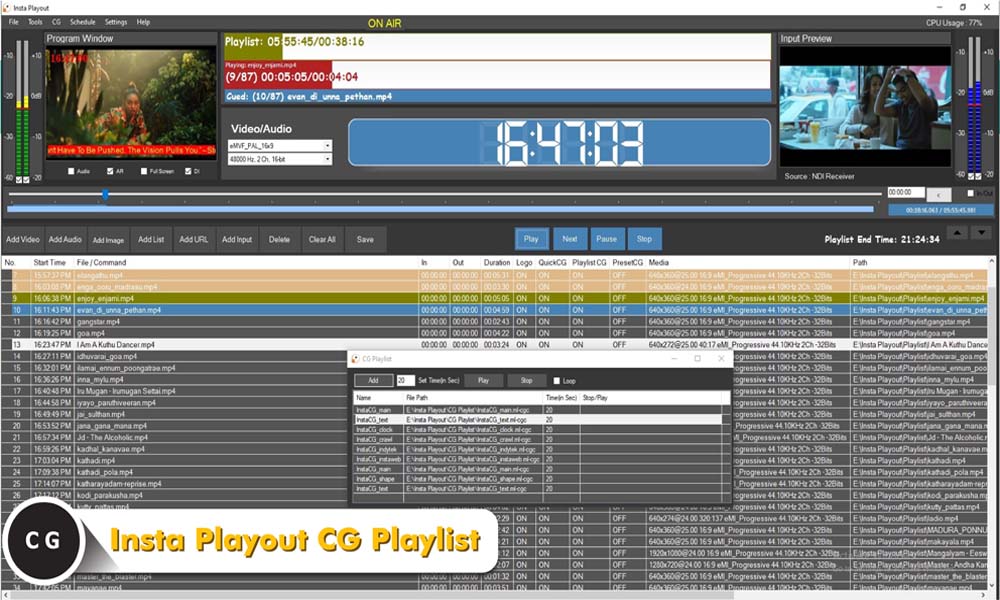
CG Playlist
Automate your on-screen graphics with a dedicated CG playlist. Schedule logos, tickers, and overlays to appear and disappear automatically throughout your broadcast.
- Queue multiple CG items in sequence
- Set timers for each graphic element
- Loop graphics continuously if needed
- Play, stop, and preview each item
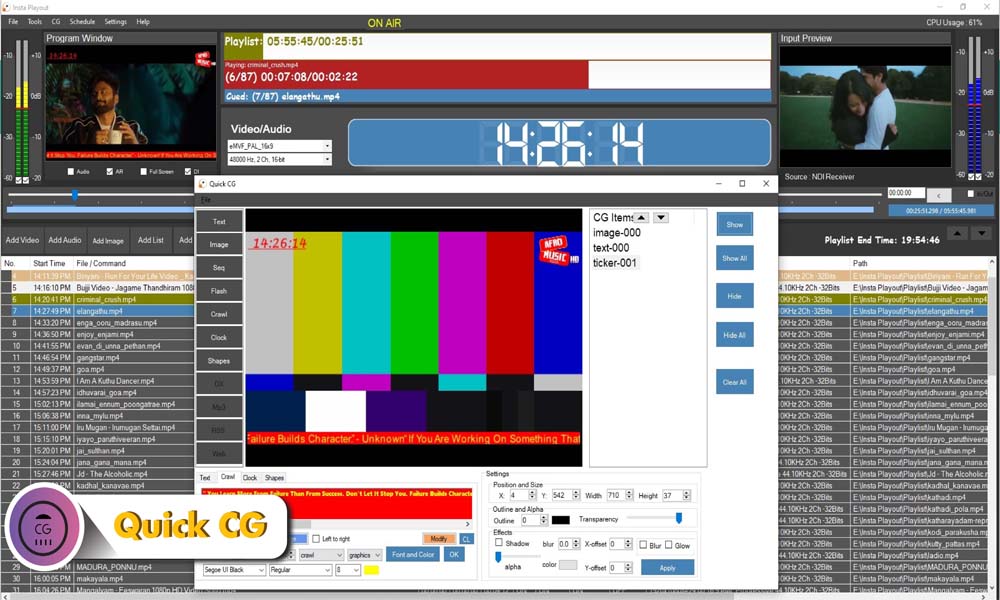
Quick CG
Instantly add and control on-screen graphics during a live broadcast. The Quick CG panel gives you real-time control over text, images, tickers, clocks and shapes without interrupting the stream.
- Text, image, ticker, clock, and shape overlays
- Show, hide, or clear graphics instantly
- Adjust position, size, transparency & effects
- Live preview before pushing to air
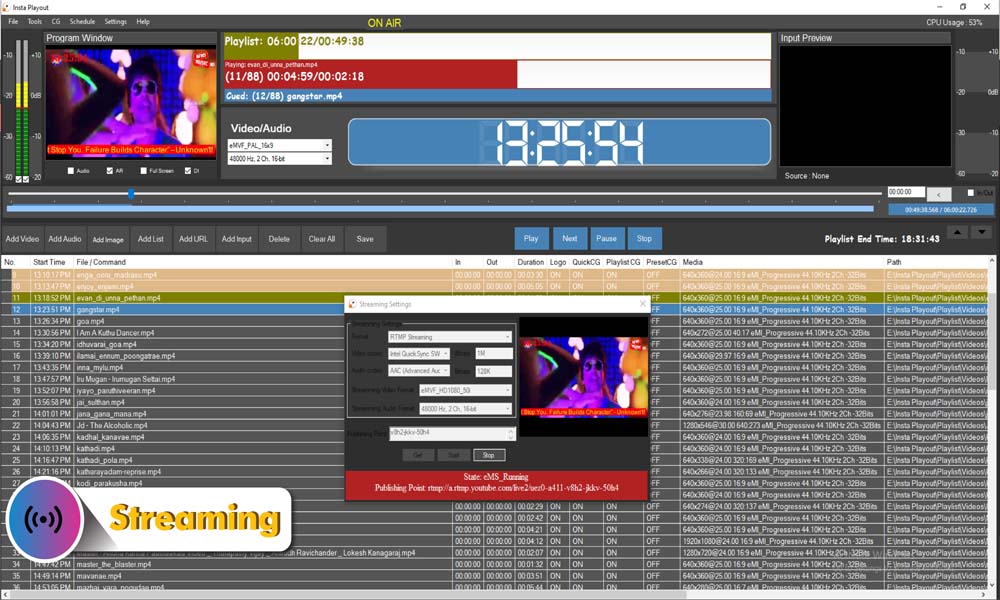
Streaming
Go live to YouTube, Facebook, or any RTMP platform in one click. Broadcast via SRT, UDP, and DVB for professional-grade distribution — no third-party software needed.
- RTMP streaming to YouTube, Facebook & IPTV
- SRT (Secure Reliable Transport) for low-latency streaming
- UDP streaming for local network & IPTV distribution
- DVB (Digital Video Broadcasting) for cable & satellite
- Configurable video bitrate & sync settings
- Live status indicator with stream URL display
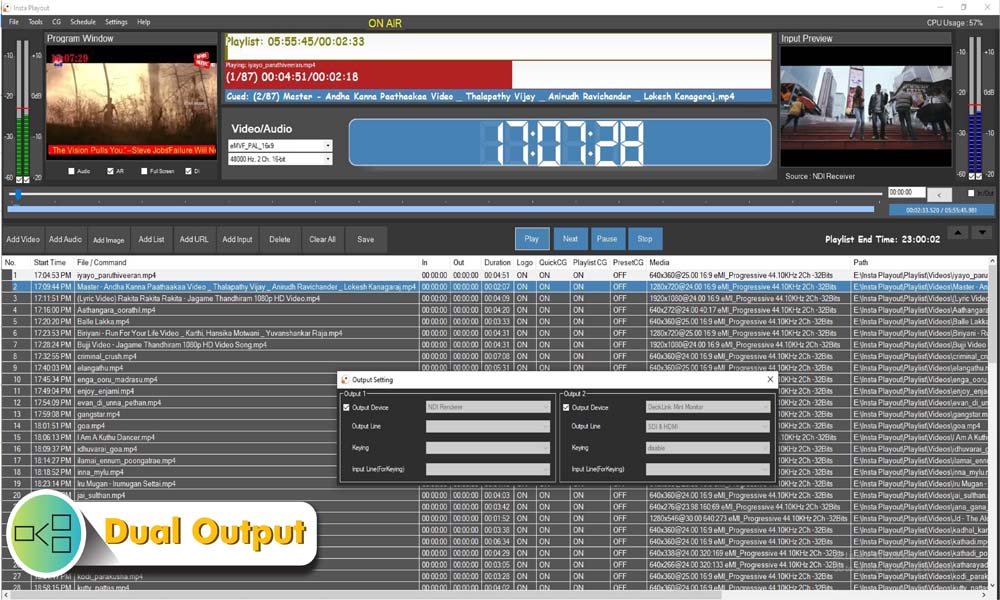
Dual Output
Broadcast to two destinations simultaneously. Send your program to an NDI renderer and a hardware playout card at the same time — perfect for studios with multiple screens or distribution needs.
- Independent Output 1 and Output 2 configuration
- Supports NDI Renderer and hardware cards
- DeckLink and HDMI output support
- Keying and input line settings per output
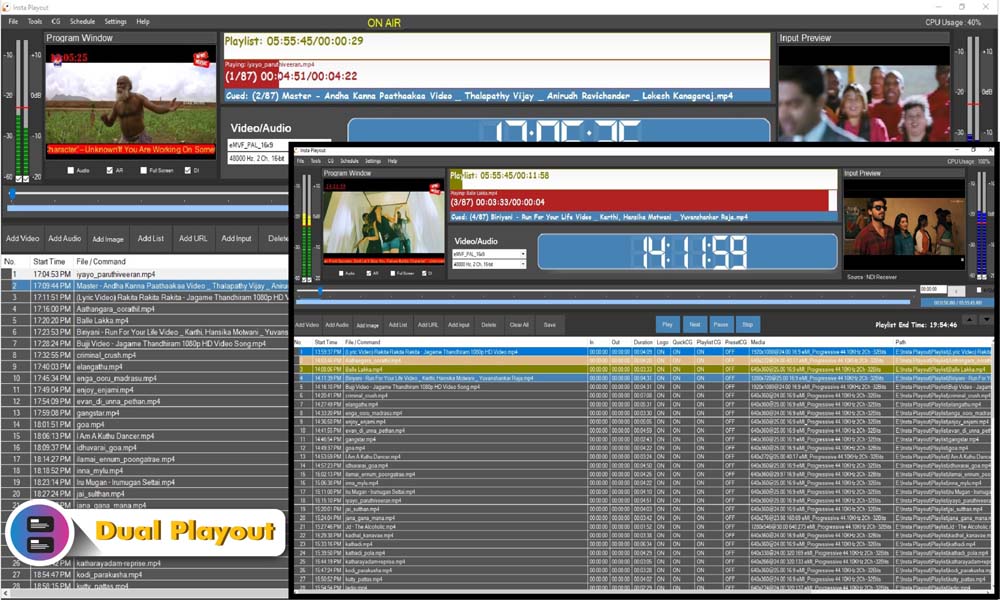
Dual Playout
Run two independent playout instances on a single machine with just one license. Each instance has its own playlist, CG, and output — ideal for multi-channel broadcasting from one PC.
- Two fully independent playout windows
- Separate playlists and CG per channel
- Perfect for running 2 channels simultaneously
- Efficient resource usage on one PC
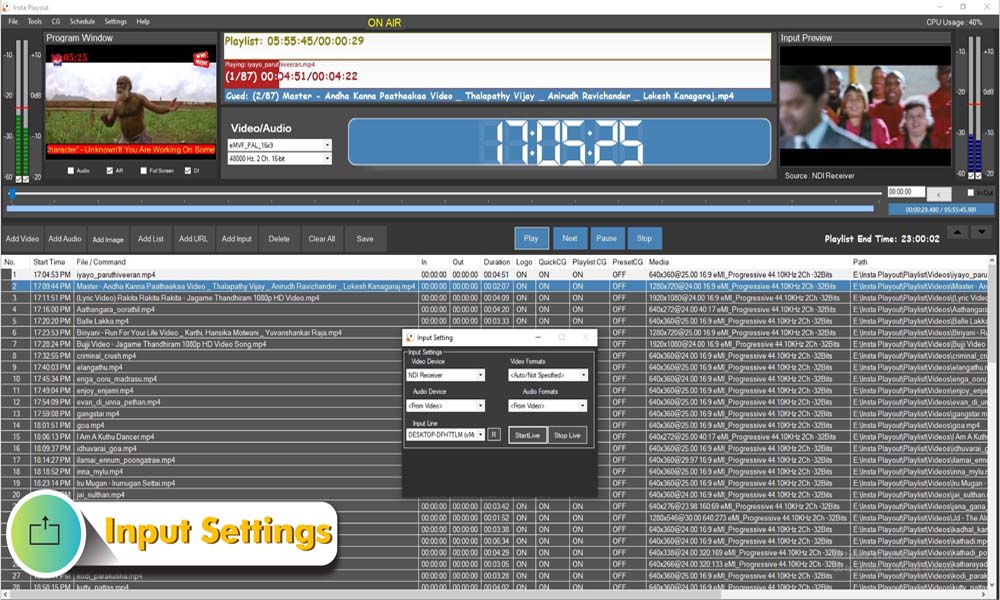
Input Settings
Bring in live video from any source — NDI receivers, capture cards, or cameras. Configure video and audio formats to match your production setup precisely.
- NDI Receiver and capture card support
- Configure video & audio device and format
- Start and stop live input with one click
- Compatible with standard broadcast formats
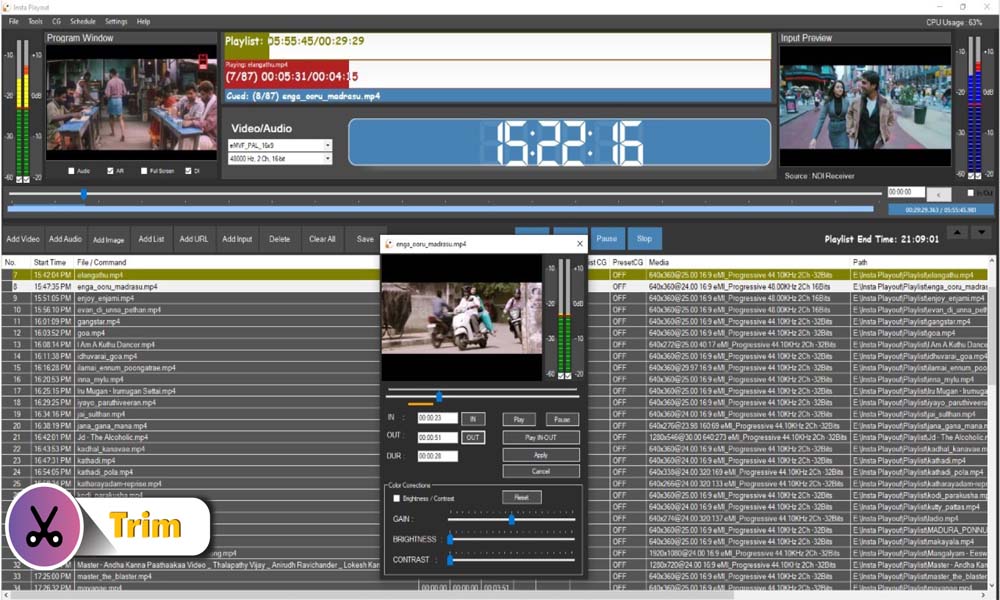
Trim Editor
Set precise In/Out points for any video in your playlist without editing the source file. Built-in color correction tools let you adjust brightness, contrast, and gain on the fly.
- Visual trim with IN and OUT point markers
- Preview trimmed clip before saving
- Brightness, contrast & gain color correction
- Non-destructive — original file stays untouched
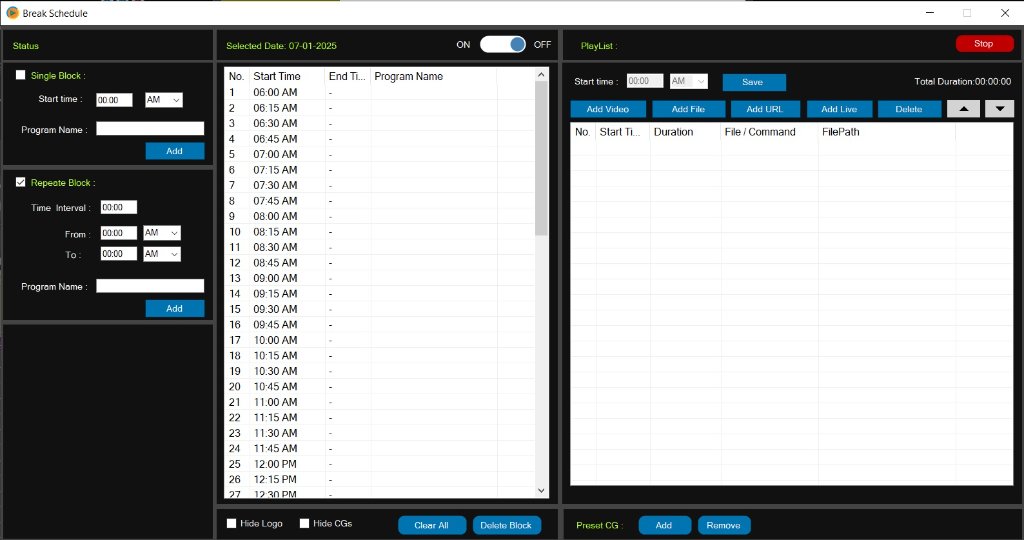
Break Schedule
Automate commercial breaks and program blocks with a visual schedule grid. Define single or repeating breaks throughout the day and assign playlists to each time slot.
- Single block and repeating block scheduling
- Visual 24-hour time grid for the whole day
- Assign video playlists to each break slot
- Preset CG overlays per schedule block
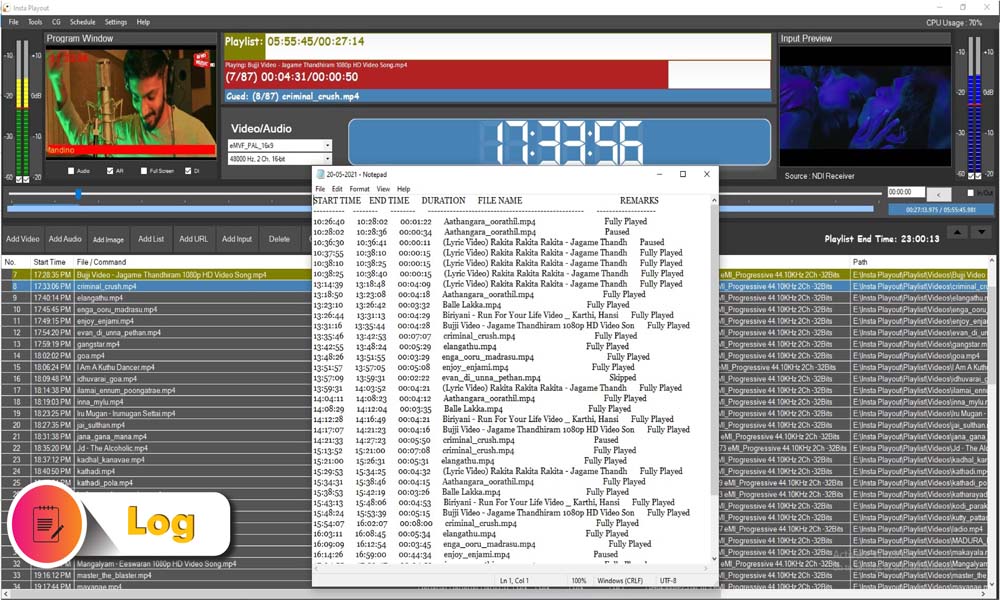
Broadcast Log
Keep a detailed record of everything that aired. The broadcast log captures every clip played with exact start and end times, durations, and playback status — essential for compliance and review.
- Auto-generated log with timestamps
- Records file name, duration & play status
- Fully Played, Paused, and Skipped entries
- Exportable as a text file for records
Scheduling & Automation Features
Playlist Scheduling
Create and manage broadcast playlists with drag-and-drop scheduling. Add media files, set durations, and build complete channel rundowns in minutes.
Daily, Weekly & Monthly Scheduling
Build recurring schedules for continuous channel operation. Define programme blocks that repeat automatically across the week or month.
Broadcast Automation
Automate programming, commercial breaks, and graphics triggers. Insta Playout runs your entire channel schedule without operator intervention.
Commercial Break Automation
Insert commercials with frame-accurate timing using the break schedule system. Assign ad playlists to specific time slots across the broadcast day.
As-Run Logs
Generate detailed playback and compliance reports automatically. Every clip, duration, and playback status is recorded with exact timestamps.
EPG Generation
Export Electronic Programme Guide data for IPTV middleware and cable headend systems. Keep your subscribers informed with accurate schedule data.
Video Playback Features
SD / HD / 2K / 4K Playback
Play back video at any resolution from standard definition through Ultra HD. Insta Playout handles all broadcast-standard resolutions without additional configuration.
Multi-Format Video Support
Supports MP4, MXF, MOV, AVI, and all major broadcast video formats. No format conversion needed — import and play directly.
Gapless Playback
Smooth, continuous playout between clips with no gaps, black frames, or freezes. Essential for professional on-air presentation.
Playlist Looping
Loop playlists automatically when the end is reached. Ideal for 24/7 channel automation where content repeats on a schedule.
Clip Trimming
Set In and Out points for any clip without modifying the source file. Non-destructive trimming keeps your media library intact.
Live Input Switching
Switch between pre-recorded content and live camera or NDI inputs during broadcast. Seamlessly mix live and file-based playout.
Graphics & Channel Branding
Channel Logos
Display your channel logo as a persistent bug overlay throughout the broadcast. Supports PNG with transparency for professional branding.
Lower Third Graphics
Add animated lower thirds for presenter names, programme titles, and sponsor messages. Schedule them automatically or trigger manually.
News Tickers
Scroll breaking news, sports scores, or programme information across the bottom of screen in real time.
Digital Clocks
Display live broadcast clocks, countdowns, or time zones anywhere on screen. Useful for news, sports, and live event coverage.
Scrolling Text Crawls
Add horizontal or vertical scrolling text crawls for emergency alerts, programme information, or promotional messages.
Animated Graphics
Import animated GIFs and video overlays for dynamic channel branding, transitions, and promotional bumpers.
Multi-Layer Character Generator
Stack multiple graphic layers simultaneously — logo, ticker, lower third, and clock all visible at once without interfering.
NDI & IP Production Workflows
NDI Input
Receive NDI streams from cameras, production switchers, vMix, OBS, and other NDI-enabled systems over standard Gigabit Ethernet — no cables required.
NDI Output
Distribute your complete program feed as an NDI signal over the local network. Any NDI-compatible device can receive it instantly.
Hybrid NDI + SDI Workflows
Mix traditional SDI hardware and modern IP-based NDI sources in the same workflow. Insta Playout bridges legacy and modern broadcast infrastructure.
OBS Integration
Receive NDI output from OBS Studio directly into Insta Playout. Use OBS for production and Insta Playout for automated playout and scheduling.
vMix Integration
Connect vMix productions to Insta Playout via NDI. Use vMix for live switching and Insta Playout for channel automation and distribution.
Streaming & Distribution Features
RTMP Streaming
Stream to any RTMP-compatible platform including CDNs, media servers, and streaming aggregators. Supports all standard RTMP destinations.
SRT Streaming
Secure, low-latency video delivery using the SRT protocol with AES encryption. Ideal for professional broadcast contribution over public internet.
UDP Streaming
Stream via UDP multicast for IPTV headend distribution across local networks. Standard protocol for cable and IPTV operators.
RTSP Streaming
Publish streams using the RTSP protocol for compatibility with IPTV players, set-top boxes, and media servers that require RTSP input.
YouTube Streaming
Go live on YouTube directly from Insta Playout using the built-in RTMP encoder. No additional software or OBS required.
Facebook Streaming
Broadcast live to Facebook Pages and Groups via RTMP. Stream your channel programming directly to your Facebook audience.
Multi-Destination Streaming
Output to multiple streaming destinations simultaneously — RTMP, SRT, UDP, and NDI all at the same time from a single playout instance.
Broadcast Hardware Integration
Blackmagic DeckLink Support
Full support for Blackmagic DeckLink capture and output cards. Professional SDI I/O for broadcast-grade signal quality.
SDI Input
Receive SDI video signals from cameras, routers, and broadcast equipment directly into Insta Playout as a live source.
SDI Output
Output your programme feed as SDI to monitors, transmitters, uplinks, and cable headends. Frame-accurate professional broadcast output.
Multi-Output Broadcasting
Send your signal to multiple physical outputs simultaneously — SDI, HDMI, and NDI all active at the same time.
Professional Broadcast Hardware Support
Compatible with a wide range of professional broadcast capture cards and output devices beyond DeckLink, including AJA and Magewell.
Multi-Channel Broadcasting
Dual Playout
Run two fully independent channel instances on a single workstation under one license. Each channel has its own playlist, graphics, and output.
Multiple Channel Support
Scale to multiple channels on dedicated hardware. Each channel operates independently with its own schedule and output configuration.
Independent Schedules
Each channel maintains its own programming schedule, break schedule, and automation rules — fully isolated from other channels.
Independent Outputs
Each channel instance outputs to its own destination — separate streams, NDI feeds, or SDI outputs per channel.
Channel Monitoring
Monitor all running channels from a single interface. Track playback status, upcoming items, and output health for each channel.
Monitoring & Reporting
Playback Logs
Automatically log every clip played with exact start time, end time, duration, and status. Complete audit trail for every broadcast hour.
As-Run Reports
Export broadcast logs as formatted reports for compliance, advertiser proof-of-play, and regulatory submissions.
Channel Preview
Monitor your programme output in real time inside the application without requiring an external monitor or capture device.
Schedule Monitoring
Track upcoming items in the playlist, countdown to next item, and remaining duration of the current clip at a glance.
Error Recovery
Automatic fallback playlists activate when a clip fails to play. Insta Playout keeps your channel on air even when errors occur.
Features for Every Broadcast Workflow
Insta Playout delivers professional broadcast playout software features for every type of broadcaster — from national TV stations to volunteer-run community channels.
Why Broadcasters Choose Insta Playout
A complete playout software and broadcast automation software platform — on a one-time license.
Supported Outputs & Protocols
Insta Playout distributes your channel via every major broadcast protocol simultaneously — RTMP, SRT, UDP, NDI, SDI, RTSP, and DVB.
RTMP
Real-Time Messaging Protocol. The standard for streaming to YouTube, Facebook, CDNs, and IPTV media servers. Supported by virtually every streaming platform.
SRT
Secure Reliable Transport. Low-latency, encrypted video delivery over public internet. Ideal for broadcast contribution and IPTV distribution.
UDP
User Datagram Protocol. High-efficiency multicast streaming for IPTV headend systems and local network distribution. Standard for cable and IPTV operators.
RTSP
Real Time Streaming Protocol. Broad compatibility with set-top boxes, IPTV players, and media servers that require RTSP input.
NDI
Network Device Interface by NewTek. IP-based video transport over Gigabit Ethernet. Eliminates SDI cabling for modern studio and production workflows.
SDI
Serial Digital Interface. Professional broadcast-grade video output for cable headends, satellite uplinks, transmitters, and studio routing.
DVB
Digital Video Broadcasting. Standard for digital terrestrial, satellite, and cable television distribution. Required for broadcast licensing in many countries.
Why Insta Playout is Different
Frequently Asked Questions
What features are included in Insta Playout?
Insta Playout includes playlist scheduling, broadcast automation, commercial break automation, multi-layer graphics (logos, lower thirds, tickers, clocks), NDI input/output, SRT streaming, RTMP streaming, UDP streaming, SDI output, dual playout, EPG generation, as-run logging, trim editor, and live input switching — all in one desktop application.
Does Insta Playout support NDI?
Yes. Insta Playout supports both NDI input — receiving live feeds from NDI cameras, vMix, OBS, and production switchers — and NDI output, distributing your complete programme feed over standard Gigabit Ethernet to any NDI-compatible device on the network.
Does Insta Playout support SRT?
Yes. Insta Playout includes native SRT (Secure Reliable Transport) streaming with AES encryption for secure, low-latency video delivery over public internet. SRT is ideal for broadcast contribution links and professional IPTV distribution.
Can I automate a TV channel with Insta Playout?
Yes. Insta Playout is purpose-built for 24/7 unattended broadcast automation. Build your playlist schedule, assign commercial breaks, configure graphics automation, and the system runs your channel continuously without manual intervention.
Can I run multiple channels from one PC?
Yes. Insta Playout supports dual playout — two fully independent channel instances on one machine with one license. Each channel has its own playlist, graphics, and output configuration.
Does Insta Playout support IPTV workflows?
Yes. Insta Playout outputs to IPTV headend systems via UDP and SRT protocols, generates EPG data for IPTV middleware, and supports simultaneous multi-destination output — making it a complete IPTV channel software solution.
Can I output SDI and RTMP simultaneously?
Yes. Insta Playout supports simultaneous multi-destination output. You can send your programme feed to SDI hardware, RTMP streaming platforms, SRT destinations, UDP multicast, and NDI all at the same time from a single playout instance.
What hardware is required to run Insta Playout?
Insta Playout runs on standard Windows PC hardware. A modern multi-core processor, 8GB+ RAM, and a dedicated GPU are recommended for HD/4K playout. For SDI output, a Blackmagic DeckLink or compatible capture card is required. NDI and RTMP streaming work without additional hardware.