Church TV Playout Software for Ministry Broadcasting
Broadcast your services, sermons, and devotional content around the clock — automatically. Insta Playout gives churches and ministries a professional TV channel that volunteers can operate, without the cost of a broadcast engineering team.
Why Churches Are Launching TV Channels
The pandemic permanently changed the relationship between churches and digital media. Congregations that had never considered broadcasting suddenly found themselves live streaming services and building digital communities. What emerged from that period was a clear realization: the reach of a church is no longer limited by the size of its building.
Today, forward-thinking ministries are going beyond simple live streams. They are launching dedicated 24/7 TV channels — broadcasting sermons throughout the week, airing worship programs, hosting teaching series, and reaching homebound members and international communities who cannot attend in person. A church TV channel is no longer a luxury for major ministries. With the right software, it is achievable for any congregation.
Insta Playout was designed with faith-based broadcasters in mind. We understand that your media team is likely a group of dedicated volunteers, not professional broadcast engineers. Our TV Channel Playout software provides everything you need to run a professional 24/7 broadcast channel — scheduling, graphics, live streaming — in an interface that does not require a technical background to master.
From a small church in a rural community to a large megachurch with multiple campuses, Insta Playout scales to fit your ministry's needs and budget. For churches distributing to cable or IPTV operators, our software handles UDP and DVB output with no extra hardware.
See a Church Channel Powered by Insta Playout
See a real example of a church television channel running with Insta Playout — broadcasting sermons, worship sessions, and devotional content 24/7 automatically.
DEVOTIONAL CHANNEL — SAMPLE BROADCAST
Sample 24/7 Church TV Channel Created with Insta Playout
Example Use Cases: Worship Channel • Prayer Channel • Bible Teaching Channel • Community Church TV • Christian IPTV Channel
This sample devotional channel demonstrates how churches can create and operate a professional 24/7 television channel using Insta Playout. The software automates content scheduling, channel branding, scripture crawls, and live streaming, helping churches reach their congregation through television, YouTube, IPTV platforms, and social media.
Run Your Church TV Channel 24/7
Broadcast sermons, worship sessions, Bible readings, announcements, and devotional programs automatically using Insta Playout. Schedule content days or weeks in advance, add your church logo and scripture crawls, and stream directly to YouTube, Facebook, IPTV, or cable networks.
- Schedule sermons automatically
- Display church logo and branding
- Add Bible verse crawls and announcements
- Stream to YouTube and Facebook Live
- Create a 24/7 devotional channel
- Support HD and 4K broadcasting
Own your church channel with a one-time license starting from just $99 — no monthly fees, ever.
3,000+
Channels Launched
70+
Countries
10+
Years Running
Trusted by churches, broadcasters, IPTV operators, schools, and content creators worldwide.
Stream to All These Places at Once
One broadcast from your PC — your audience watches everywhere
+ Any other RTMP-compatible platform (Twitch, LinkedIn Live, and more)
Desktop Church TV Software vs Cloud Playout Services
Unlike web-based playout tools that require uploading your media to a remote server, Insta Playout runs entirely on your own Windows PC. Your sermon recordings, worship videos, and devotional content stay on your local drive — ready to broadcast instantly, with no upload wait times or cloud storage fees.
Insta Playout Desktop Software
✓ Recommended for Churches- No file uploading — Drag your sermon videos directly from your local drive — no waiting, no upload limits.
- One-time payment — Pay once, own it forever. No monthly fees — ideal for churches on a tight budget.
- Works without internet — Local playout runs even if your internet goes down. Internet is only needed for live streaming outputs.
- Full HD & 4K playback — Plays large, high-quality video files smoothly from your local SSD — no buffering or quality loss.
- Instant file access — Add a new sermon recording to your playlist seconds after the service ends — no upload wait.
- Complete data privacy — Your church's content stays on your own computer — never stored on third-party servers.
Cloud Playout Platforms
Compare- Upload required — Every video must be uploaded to remote servers before it can be scheduled — time-consuming for large files.
- Monthly subscription — Ongoing fees that add up year after year — a significant cost for non-profit church budgets.
- Internet-dependent — If your internet connection drops, your channel can go down. No offline fallback.
- Compressed playback — Cloud encoding often reduces video quality to save bandwidth — affecting your broadcast quality.
- Delayed workflow — Hours between recording a service and being able to air it while the upload completes.
- Data on third-party servers — Your ministry's content is stored and processed on servers outside your control.
Bottom line for churches: Your content library stays on your local PC. No upload delays, no monthly bills, no dependency on cloud infrastructure — just reliable, automated broadcasting from your own hardware.
Built for Faith-Based Broadcasting
Every feature your church needs to run a professional TV ministry — without the technical complexity or the expensive hardware.
24/7 Devotional Channel
Broadcast sermons, worship music, Bible teaching, and ministry content around the clock automatically. Your church on TV even when no one is in the building.
Service Scheduling
Schedule live services, daily devotionals, and repeat broadcasts on a weekly timetable. Recordings from Sunday air automatically throughout the week.
Volunteer Operated
Simple enough for any church volunteer to learn in an afternoon — no broadcast engineering training or IT expertise required.
Reach Beyond Your Walls
Stream to YouTube Live, Facebook Live, or IPTV so homebound members, remote family, and international viewers can watch from anywhere.
Scripture & Lyric Overlays
Use the built-in CG editor to display scripture references, song lyrics, speaker names, and announcements as professional lower thirds and tickers.
Multi-Platform Distribution
Simultaneously broadcast to cable TV, IPTV, YouTube, Facebook, and your church website — from one playout system, reaching every platform your congregation uses.
Works Seamlessly with vMix & OBS Studio for Church Broadcasting
Many churches already use vMix or OBS Studio for Sunday services and live events. InstaPlayout integrates seamlessly with both platforms, allowing ministries to combine live production, scripture overlays, worship graphics, automated scheduling, and 24/7 broadcasting from a single workflow.

vMix Integration for Church Live Production
Professional Live Production
vMix supports full NDI send and receive — making it a perfect production partner for Insta Playout. Use vMix for live multi-camera switching during services, then send its NDI output directly into Insta Playout's playlist as a live source. Insta Playout can also send its playlist output back to vMix via NDI for further mixing or recording.
- Send vMix NDI output → Insta Playout playlist as a live input
- Receive Insta Playout NDI playlist output back into vMix for recording or mixing
- Insta Playout playlist auto-resumes after live service ends in vMix
- Broadcast the combined workflow to YouTube, Facebook, IPTV, and cable simultaneously
- Use vMix titles and graphics alongside Insta Playout's scheduled content

OBS Studio Integration for Church Streaming
Free Open-Source Streaming
OBS Studio supports NDI send and receive via the free OBS-NDI plugin. Use OBS for your live worship production — then send its NDI output directly into Insta Playout's playlist as a live source. Insta Playout can also output its playlist back to OBS via NDI, letting OBS record or stream the full channel with additional overlays.
- Send OBS NDI output → Insta Playout playlist as a live input (via OBS-NDI plugin)
- Receive Insta Playout NDI playlist output back into OBS for recording or re-streaming
- Insta Playout playlist auto-resumes with scheduled content when OBS live ends
- Add OBS scenes and overlays on top of Insta Playout's playlist output
- Completely free combination — zero additional cost for churches
Two-way NDI: vMix or OBS sends NDI to Insta Playout as a live playlist source — and Insta Playout sends its playlist output back via NDI so vMix or OBS can record, mix, or re-stream it. Your 24/7 scheduled channel resumes automatically when the live service ends.
Already using vMix or OBS Studio?
InstaPlayout integrates seamlessly with your existing church production workflow.
Benefits for Churches and Ministries
Reach Homebound Members
Elderly and disabled congregation members who cannot attend in person can watch services and devotional content on their TV at any time.
Extend Your Ministry Globally
International members, diaspora communities, and missionaries can stay connected to their home church through your broadcast channel.
Volunteer Friendly
The intuitive interface means your AV volunteers can build weekly schedules and manage content without professional broadcast training.
Affordable Ministry Investment
A one-time perpetual license — not a monthly subscription — keeps your ongoing operating costs low and predictable for a non-profit budget.
Professional Production Quality
Real-time graphics, branding overlays, and smooth automated transitions give your channel the appearance of a professional broadcast ministry.
Multi-Campus Synchronization
For churches with multiple locations, distribute the same broadcast channel to all campuses simultaneously via NDI or SRT streaming.
Church Broadcasting Use Cases
Sunday Service Broadcast
Live broadcast your Sunday service and automatically replay it throughout the week on your 24/7 channel.
24/7 Devotional Programming
Build a round-the-clock schedule of sermon archives, worship music, prayer services, and teaching series.
Special Events & Holidays
Pre-schedule Christmas Eve services, Easter broadcasts, and special ministry events to air at the right time automatically.
Announcement Loops
Run announcement videos and upcoming event promotions in between programs to keep your congregation informed.
Bible Study Recordings
Air recorded weeknight Bible studies and small group content for members who missed the live session.
Community Outreach Channel
Broadcast your channel on local cable TV or IPTV to reach unchurched neighbors and build community presence.
How to Launch a Church TV Channel in 6 Steps
Install InstaPlayout on any Windows 10/11 computer at your church
Import your content — service recordings, worship videos, sermons, devotionals
Build your weekly broadcast schedule in the visual playlist editor
Add your church logo, scripture overlays, and announcement tickers
Connect to YouTube Live, Facebook, or cable TV via RTMP/SRT/SDI
Your channel broadcasts 24/7 — automatically, without staff monitoring
Professional Church TV Channel Control Interface
See how churches and ministries use InstaPlayout to schedule services, broadcast sermons, add scripture overlays, and stream to multiple platforms from a single interface. The software is designed for volunteers and church media teams, making professional broadcasting simple and reliable.
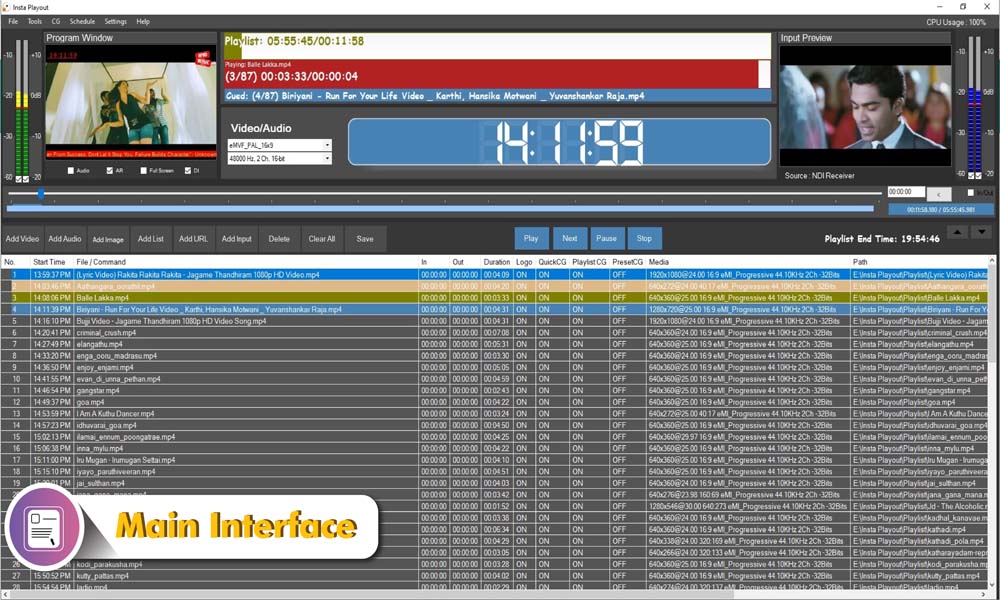
Main Interface
Manage your church channel, playlists, schedules, and live broadcasts from one easy-to-use dashboard.
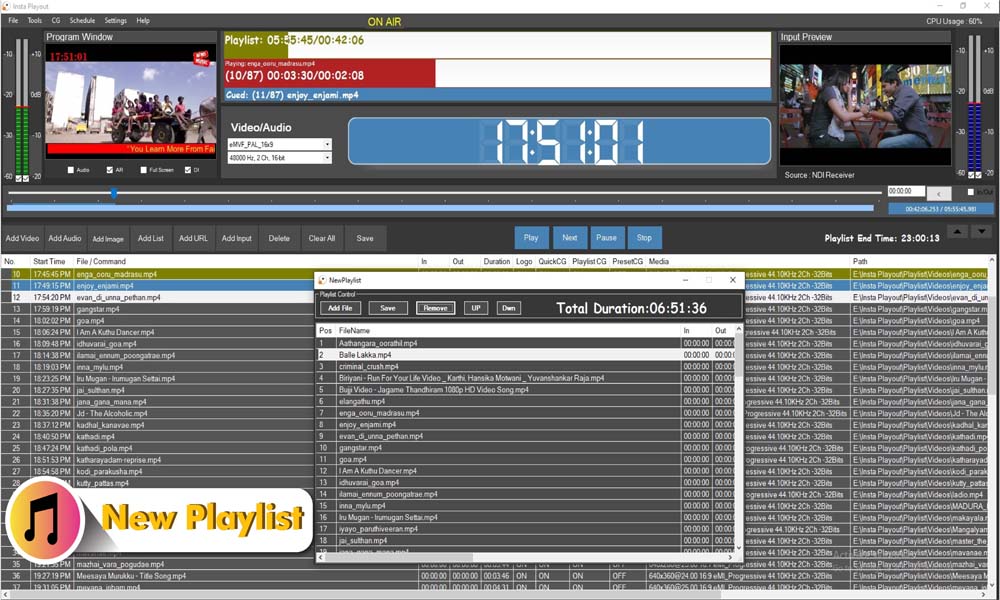
Playlist Manager
Schedule Sunday services, sermon archives, worship programs, and devotionals weeks in advance.
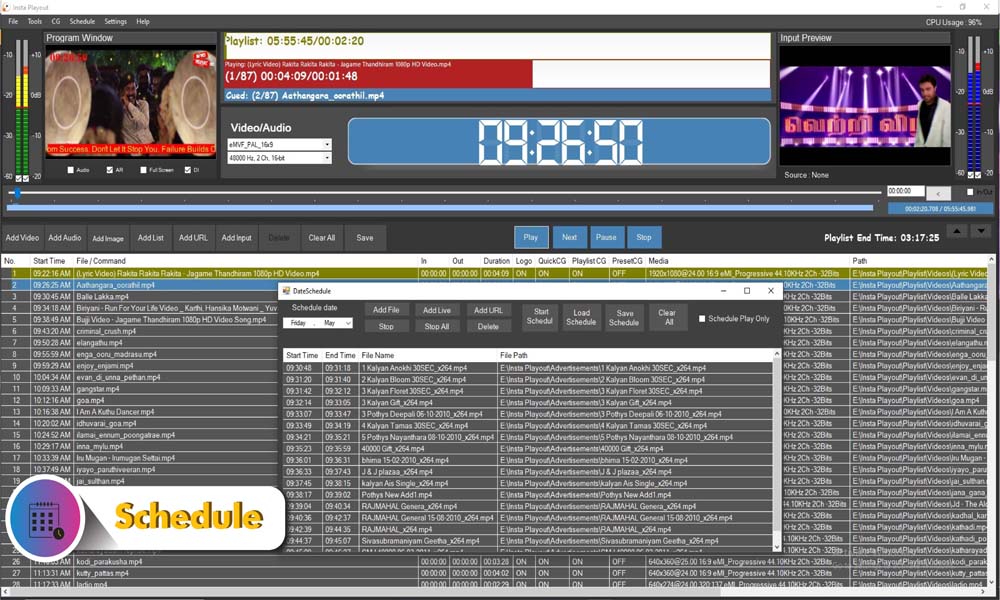
Schedule Editor
Create weekly broadcast schedules for services, Bible studies, special events, and holiday programming.
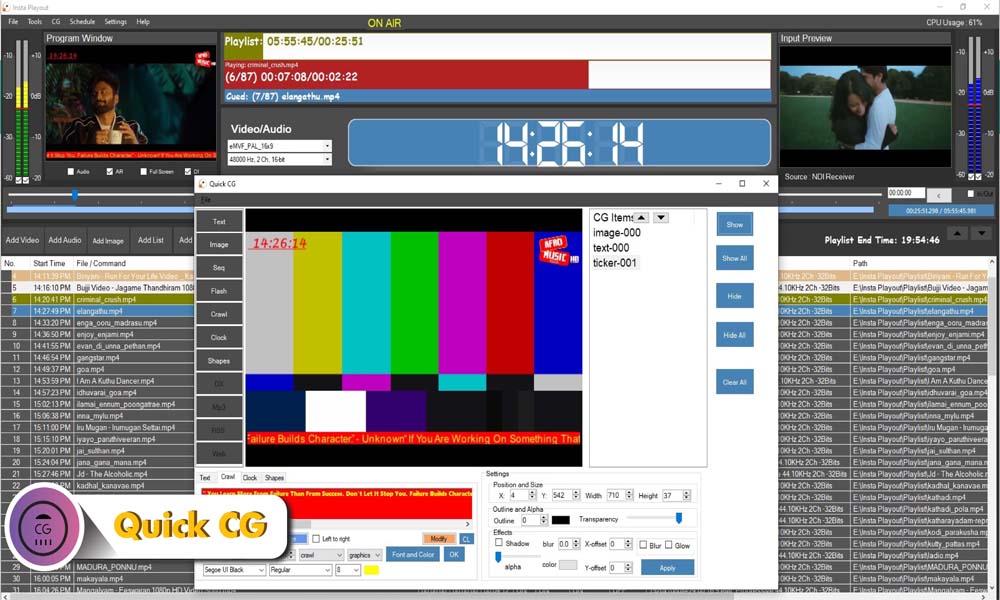
CG Graphics Editor
Display scripture verses, song lyrics, speaker names, church branding, and announcements using built-in graphics tools.
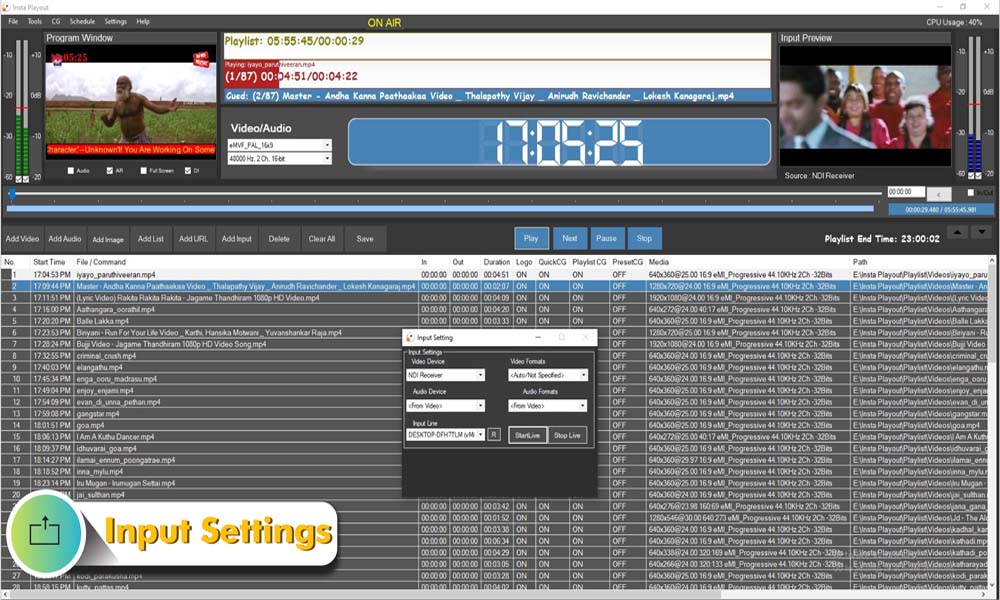
NDI Configuration
Connect NDI-enabled cameras and production systems for live church broadcasting and multi-campus ministry workflows.
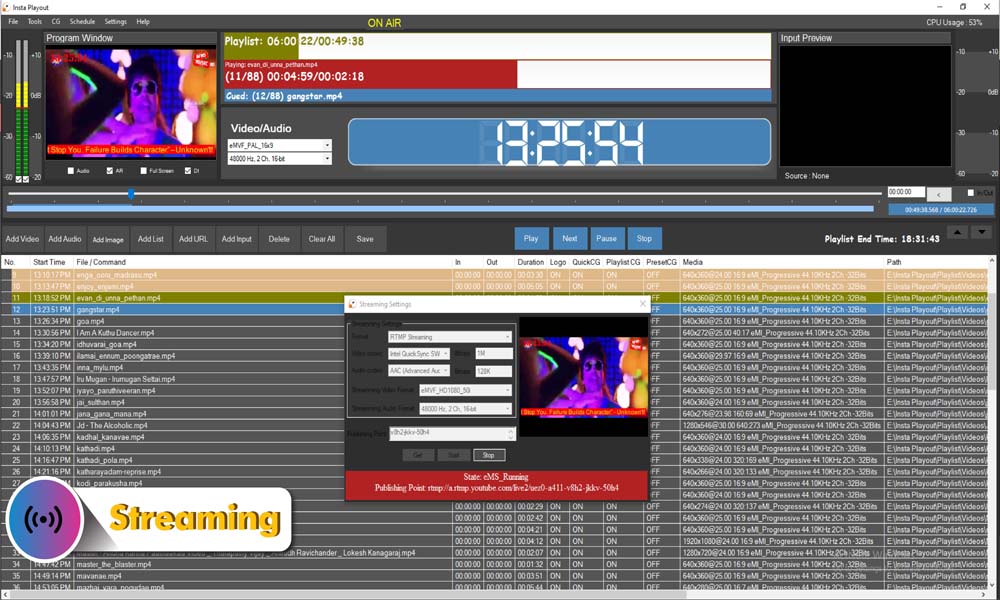
Streaming & Output Settings
Broadcast simultaneously to YouTube, Facebook, IPTV platforms, church websites, and cable TV systems from a single PC.
Trusted by broadcasters, churches, schools, IPTV operators, and content creators in 70+ countries.
Why Churches Choose InstaPlayout
Church Live Streaming Software
InstaPlayout is more than a playout system — it is a complete church live streaming software solution. Whether you are streaming a Sunday service to YouTube Live, broadcasting a midweek prayer meeting on Facebook, or running a 24/7 devotional channel on IPTV, InstaPlayout handles it all from a single Windows PC.
Unlike general-purpose streaming tools, InstaPlayout is built for unattended, automated operation. Once your weekly schedule is programmed, your channel runs itself — no volunteer needs to sit at the computer overnight. Sermons, worship sets, announcements, and special programs all air at exactly the right time, with your church branding overlaid automatically. For churches using NDI cameras, our NDI Playout workflow makes live production simple.
Stream simultaneously to YouTube, Facebook, your church website, and local cable TV — all from one system. For remote campuses or international contributors, SRT Streaming Software provides broadcast-grade, low-latency video transport with no additional hardware required.
What Churches Are Saying
"We launched a 24/7 devotional channel in one weekend. Our volunteers learned the software in a few hours and now the channel runs by itself all week. Our homebound members watch it every day."
Pastor David M.
Senior Pastor, Community Church — USA
"InstaPlayout replaced a setup that cost us ten times more. We stream our Sunday services live to YouTube and Facebook simultaneously, and the recordings air automatically throughout the week."
Brother Thomas K.
Media Director, Faith Tabernacle — Nigeria
"Our church has no dedicated IT team — just two volunteers. InstaPlayout was simple enough for them to master in an afternoon. The scripture overlay feature is beautiful for our worship programs."
Rev. Sarah L.
Media Ministry Lead, Grace Church — UK
"We now broadcast to YouTube, Facebook, and local cable TV simultaneously from one PC. The congregation loves that they can watch us wherever they are. InstaPlayout made this possible on a church budget."
Elder James O.
AV Coordinator, Harvest Assembly — Kenya
Ready to Launch Your Church TV Channel?
Start your free 14-day trial and see how easy it is to schedule sermons, worship programs, and devotional content for 24/7 broadcasting.
Church TV Software FAQs
Do we need a technical person to run church TV software?
No. Insta Playout is designed to be operated by volunteers with no broadcast engineering background. The interface is intuitive, and most users are fully operational within a few hours.
Can we broadcast live Sunday services?
Yes. Schedule a live input slot in your playlist for the service time. At the scheduled moment, the system switches to your live camera feed and returns to recorded content automatically afterward.
Can we run a 24/7 devotional channel?
Absolutely. This is one of the most common church use cases. Build a weekly schedule of sermons, worship music, and teaching content that loops and repeats automatically around the clock.
What are the system requirements for Insta Playout?
Insta Playout runs on Windows 10 or Windows 11 (64-bit). Minimum: Intel Core i5 or equivalent CPU, 8GB RAM, dedicated GPU with 2GB VRAM, and an SSD for smooth media playback. Recommended: Intel Core i7/i9 or AMD Ryzen 7/9, 16GB RAM, dedicated GPU with 4GB+ VRAM. For SDI output, a Blackmagic Design DeckLink card is required. No internet connection is needed for local playout — internet is only required for live streaming outputs.
Does Insta Playout work on Mac OS?
No. Insta Playout is a Windows-only application. It runs on Windows 10 or Windows 11 (64-bit) only. Mac OS is not supported.
How do we add scripture verses on screen?
Insta Playout includes a CG (character generator) system for creating graphic overlays. You can build scripture templates that appear as lower thirds during teaching segments.
Can we stream to YouTube and Facebook at the same time?
Yes. Insta Playout supports multiple simultaneous outputs — stream to YouTube Live and Facebook Live simultaneously via RTMP alongside any other distribution methods.
Do we need a church media team to manage it?
Not necessarily. Many churches have a single media volunteer who builds the weekly schedule. Once set up, the system runs automatically through the week.
What cameras work with this software?
Any camera that outputs HDMI can be connected via a capture card. For IP cameras, we support NDI-enabled cameras and RTSP/SRT network cameras.
Can we display song lyrics on screen during worship?
Yes. Using the graphics system, you can create lyric overlays that display in real time during worship segments — either pre-programmed or manually triggered.
Is there a subscription fee?
Insta Playout uses a one-time perpetual license model. There is no ongoing monthly subscription fee, making it very cost-effective for churches on fixed budgets. Three versions are available: NDI Version at $99, WebTV Version at $149 (most popular), and Full Version at $299 — all include a lifetime license with 1 year of updates and support.
Can we broadcast to our local cable TV channel?
Yes. With a Decklink SDI output card, Insta Playout can feed your program signal directly to your local cable provider's headend.